Best AI Makeup Try-On Tools in 2026 (Free, No Download)
Searching for the best AI makeup try on tool usually means one thing: you want to see a look on your own face before you spend money, and you want to do it in a browser without installing anything. This guide compares the browser-based AI makeup try on tools that are actually worth your time in 2026 — free tiers, no-download options, and what each one is genuinely good at — and it explains how to get a realistic preview of a look on your own photo in under a minute.
Before and After Example
Drag the slider to compare the original photo with the AI try-on result.
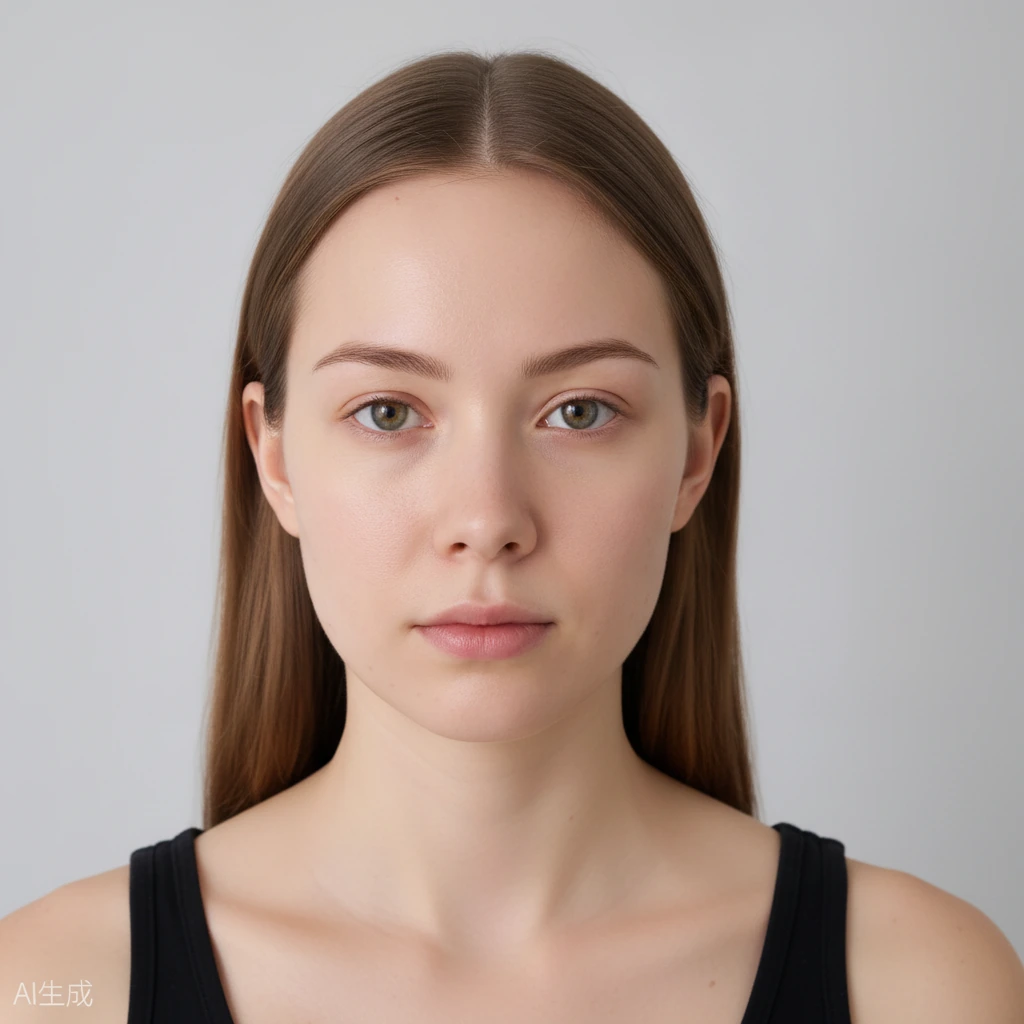
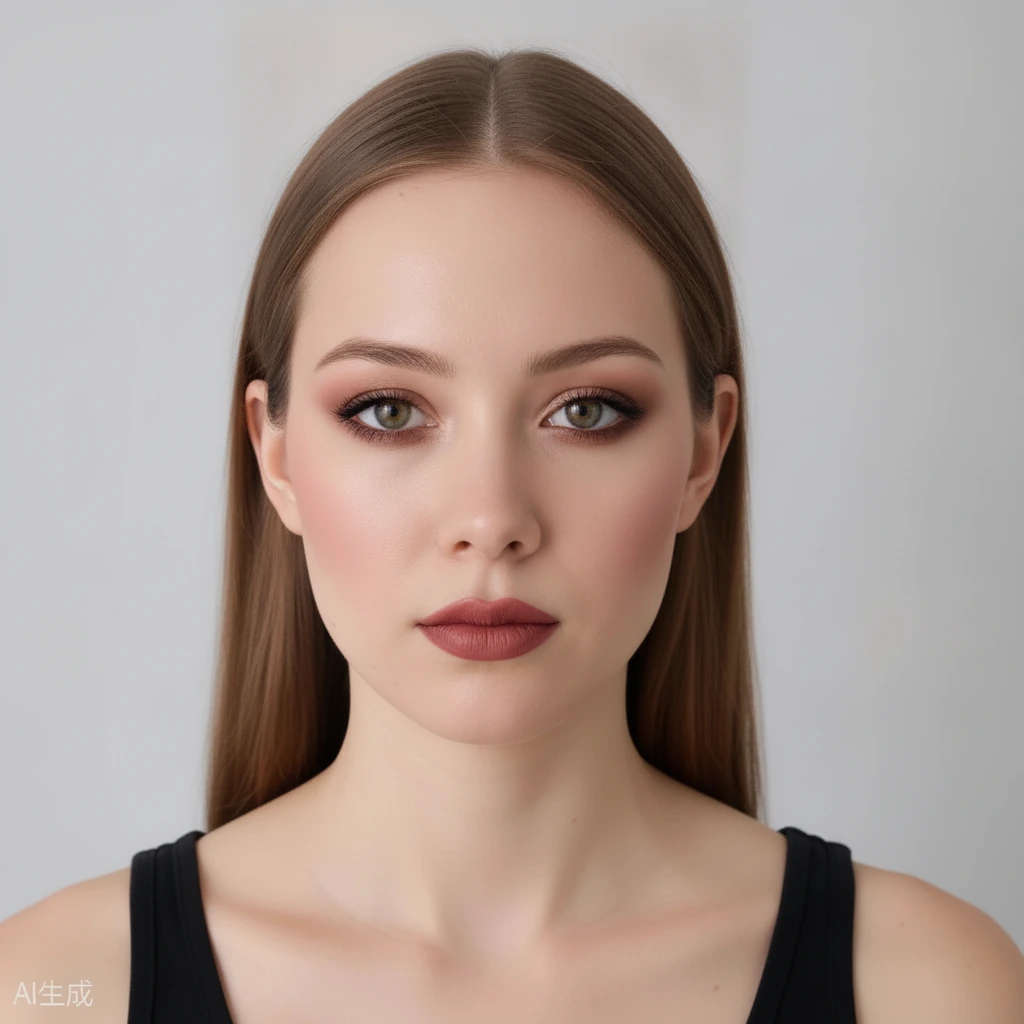 BeforeAfter
How We Compared These AI Makeup Try-On Tools
Every tool below was judged on the same five things. First, no download: can you try a look from a browser on a phone or a laptop, without installing an app? Second, free entry: can you see a real result before entering payment details? Third, realism: does the makeup sit on your actual features, or does it look like a filter sticker? Fourth, range: how many looks, shades and by-face-part options do you get? Fifth, identity: does the tool keep your own face, hair and background intact?
That last point matters more than most buying guides admit. A face swap shows you a stranger wearing lipstick. A genuine makeup try on shows you the color on your own lips, your own undertone and your own light. Only the second kind helps you decide whether to buy the product.
Best Overall for Free Browser Try-On: aitrytry
aitrytry is built around exactly the query you are reading this for: AI makeup try on in the browser, no download and no app. You upload one front-facing selfie, pick a look, and the result comes back in seconds — on your phone or your desktop.
The free plan gives new accounts 20 credits, and one generated image costs 10 credits, so you can test two looks at no cost after signing in with Google. Paid credit packs then start at 100 credits for $9.90, 300 for $29.90 and 500 for $49.90, with no subscription. That pay-per-image model suits people who want to check a lipstick shade or a wedding look rather than generate hundreds of photos.
There are seven ready-made looks (Natural Glow, Clean Girl, Soft Glam, Smokey Eyes, Bold Glam, Party Makeup and Wedding) and a by-face-part mode that lets you pick a style for eyebrows, eyes, nose, cheeks and lips separately — so you can keep everything untouched except the one feature you are shopping for.
The AI edits makeup only. Your identity, face shape, hairstyle, clothing and background stay as they are, which is what makes the preview trustworthy. A before-and-after slider shows the original photo next to the result so you can judge the difference honestly, and results can be downloaded to keep or share.
Best for Brand Product Try-On: YouCam Online Editor
Perfect Corp's YouCam Online Editor is the one to beat on feature depth: it covers eyeshadow, eyeliner, lashes, brows, lipstick in matte, gloss and shimmer finishes, foundation, blush, contour and eye color, plus an AI makeup transfer that copies a reference look onto your photo.
It is browser-based and free to experiment with, and the same rendering technology sits behind many cosmetics brands' own virtual try-on widgets. If you want the widest technical range in a free online editor, this is a strong pick — the trade-off is that you are using a general editor rather than a focused try-on flow, and heavier looks can read glossier than they would in real life.
Best for Style Variety: GoStudio.ai AI Makeup Studio
GoStudio.ai leans into volume. It ships a large library of makeup styles covering lipstick, eyeliner, mascara, contacts, foundation, blush, contour, lip liner, brows and hair color, aims at clean output without a watermark, and counts makeup plus hair color as one workflow.
There is no app to download and no credit card to start, with free credits covering the first few generations. It is a good fit if you enjoy browsing many styles and experimenting with looks you would not normally try — and a fair warning for the same reason: a library that big is fun to scroll but slower to decide from.
Best All-in-One Stylist: MyBestLook
MyBestLook positions itself as a browser-only AI stylist rather than a single-purpose try-on: makeup together with styling advice for the same photo, which suits people who want one app for the whole getting-ready decision.
It is a reasonable pick when you want direction as well as a preview. If your goal is narrower — check this exact lipstick shade, or see this exact wedding look on your own face, quickly and cheaply — a dedicated try-on tool like aitrytry gets you to the answer with fewer steps.
Free vs Paid: What You Actually Get
Across all four tools the pattern is the same: the free tier is real but small. Expect a handful of generations, sometimes only after signing in, and expect the best-resolution or watermark-free downloads to sit behind a credit pack. Nothing here is a subscription trap as long as you check whether a pack expires — credit packs that never expire are the safest way to buy.
For occasional use, the practical approach is to start with the free credits, generate two looks with the exact features you care about, and only pay once you know the preview is realistic enough to trust. For wedding or event planning, where you may test five or six looks before deciding, a per-image pack usually works out cheaper than any monthly plan.
How to Try a Makeup Look on Your Own Photo in Under a Minute
Open the try-on tool in your browser. Upload a clear, front-facing photo taken in even, natural light — no filter, no heavy shadow, hair away from the face if you want to check brows or eyes.
Pick a ready-made look, or switch to the by-face-part mode and choose a style for one or two features only. Generate the preview, then drag the before-and-after slider to compare your original photo with the result at the same framing.
If the color feels close but not exact, try a neighbouring look or a different part style and generate again. Once you have the result you like, download it and keep it next to the product listing while you shop — that is the whole point of trying makeup online.
A Note on Realism and Skin Tones
AI try-on quality has moved fast, and the honest limitation is skin tone representation: a look rendered on very light or very deep skin can shift in saturation compared with a mid-tone reference. The way around it is to judge each look on your own photo rather than on a model's, and to compare a matte and a glossy version of the same shade before trusting a product photo.
Light also changes the answer. A shade that reads warm in indoor lighting can pull cooler in daylight, so if you are choosing for a specific event, upload a photo taken in similar light to the one you will be in.
Browser-based AI makeup try-on tools compared (2026)
| Tool | Free entry | No download | Best for |
|---|---|---|---|
| aitrytry | 20 credits, 1 image = 10 credits | Yes, browser only | Free previews you can trust, by-face-part control |
| YouCam Online Editor | Free to experiment | Yes, browser only | Widest range of makeup features |
| GoStudio.ai Studio | Free starting credits | Yes, browser only | Browsing many styles, makeup plus hair color |
| MyBestLook | Free tier available | Yes, browser only | All-in-one styling advice |
Frequently Asked Questions
What is the best free AI makeup try on tool with no download?
aitrytry is a strong free pick: it runs entirely in a browser, gives new accounts 20 credits (one image costs 10), and needs no app install. YouCam Online Editor is the best free option if you want the widest feature list, and GoStudio.ai is good for browsing a large library of styles.
Can I try on makeup online without installing an app?
Yes. All four tools compared here are browser-based, so you can upload a photo and generate a preview from a phone or laptop with nothing installed. aitrytry is designed for exactly that: upload a front-facing selfie, choose a look, and the AI applies the makeup while your identity, hair and background stay unchanged.
Which AI makeup try on tool works best on a phone browser?
aitrytry and YouCam Online Editor both work in a mobile browser without an app. For phone use, upload a well-lit, front-facing photo, keep the framing consistent, and use the before-and-after slider to check how the color reads against your own skin tone.
How much do AI makeup try on tools cost in 2026?
Most have a free tier of a few generations, then pay-per-image credit packs or a subscription. aitrytry gives 20 free credits on sign-in, then packs of 100 credits for $9.90, 300 for $29.90 and 500 for $49.90, with each generated image costing 10 credits and no subscription required.
Do AI makeup try on tools work for all skin tones?
They work across skin tones, but representation is the honest weak spot of the whole category, especially at the very light and very deep ends. Judge each look on your own photo rather than a model's, and test a matte and a glossy version of the same shade so you can see how saturation shifts on your skin.
Is it private to upload my photo to an AI makeup tool?
Check the privacy page before you upload — policies differ between tools. aitrytry processes photos to generate the preview, does not sell them, and provides an account history you can delete; the full data handling is described on its privacy page.