Natural Makeup Look Try On: See the Everyday Look on Your Face
A natural makeup look try on answers a simple question: does this soft, everyday makeup actually suit me? With the Natural Glow look on aitrytry, you upload a front-facing selfie, pick the look, and the AI applies lightweight makeup with soft natural tones to your own photo in under a minute. There is no sign-up to start, it runs entirely in your browser on a phone or a desktop, and a before and after slider lets you judge the change yourself rather than taking someone else's word for it.
Before and After Example
Drag the slider to compare the original photo with the AI try-on result.
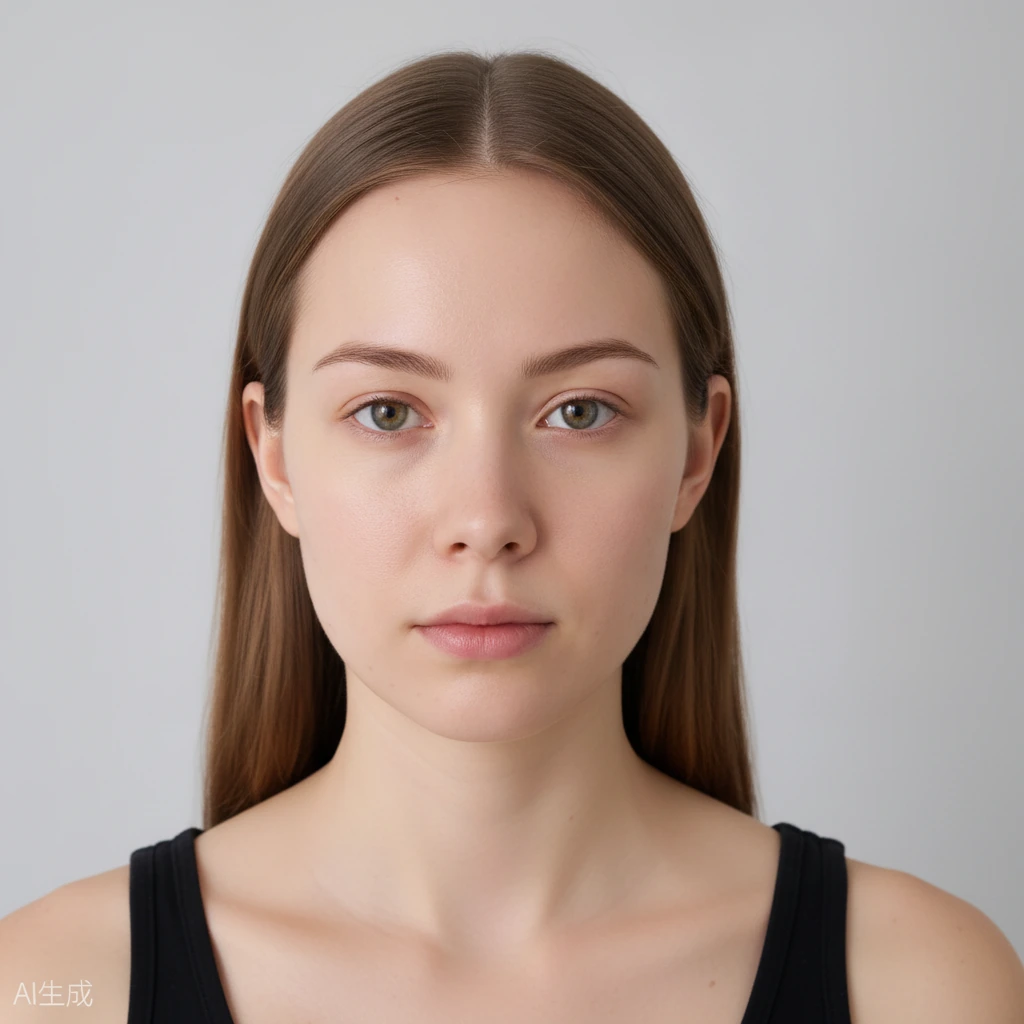
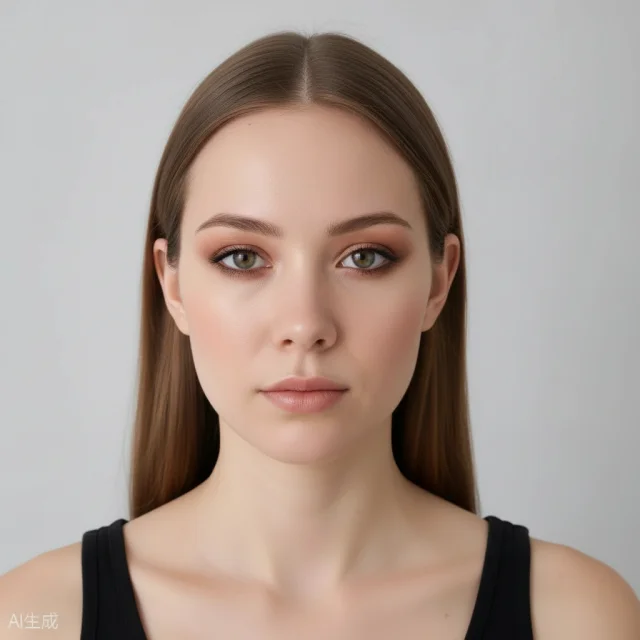 BeforeAfter
What a Natural Makeup Look Try On Actually Changes
The Natural Glow look is built around the things you would reach for on a normal morning: a sheer base, a hint of warmth on the cheeks, soft brows, and a lip that reads as your lips but better. The try on preview shows all of it on your real features, so you are not guessing from a model in a photo who looks nothing like you. Because the AI only paints makeup, your face shape, hairstyle, and background stay exactly as they were.
That last point matters more than it sounds. This is not a face swap and it is not a beauty filter that shaves your jaw or enlarges your eyes. What you see is what that makeup would look like on the face you already have, which is the only honest way to decide whether a look works for daily wear.
You can also move past the all-in-one look and apply makeup to individual parts of your face. Want the base but no eye colour, or a stronger cheek and nothing else? Adjust one area at a time with the intensity slider until the balance feels like you rather than like a template.
Judging Undertone in a Natural Makeup Look Try On
Natural makeup lives or dies on undertone, and that is the hardest thing to judge from a swatch or a product photo. Warm tones can pull orange on cool skin, and cool pinks can look grey on warm skin. Seeing the Natural Glow tones land on your own face, in your own light, is far more useful than reading a description online.
Take the preview somewhere with decent light and look at how the cheek and lip tones sit against your neck. If they blend in, you have a match. If they sit on top and fight your skin, that is your signal to try a different intensity or a different look entirely.
The intensity slider is the fastest way to test this. Drop the blush and lip down a notch, check the before and after slider, and raise it again. In a couple of passes you will find the line between barely there and obviously done, which is exactly the range natural makeup is supposed to live in.
Everyday Wear Without the Guesswork
Most people do not avoid makeup because they dislike it. They avoid it because getting it right takes time they do not have before work. A quick preview removes the trial-and-error part: you see the finished everyday face first, then decide whether it is worth copying.
Because everything runs in the browser, there is nothing to download and nothing to install. If you are curious on your phone during a commute, that is a fine place to try it. Your free daily credits reset, so you can come back and compare a few looks across the week without paying for anything.
When you land on a version you like, you can download the result or share it. Keeping a copy of the look you liked is surprisingly handy the next time you are standing in a shop trying to remember which shade actually worked on you.
Getting the Most From Your Natural Glow Preview
Start with a clear, front-facing selfie in even light. A photo where your whole face is visible and not half in shadow gives the AI the best chance to place the makeup correctly. A blurry or heavily filtered source photo will only give you a blurry answer.
Try the full Natural Glow look first, then use the part-by-part tools to pull individual areas back. Many people find the full look a touch strong for a weekday and prefer it with the eyes toned down, which is exactly the kind of adjustment the tool is built for.
Your photo stays private. It is stored securely, never submitted to search engines, and both your upload and the generated result expire and are deleted automatically after a limited time. You can experiment freely without wondering where your face ends up afterwards.
Frequently Asked Questions
Do I need to sign up to try a natural makeup look?
No. You can start without creating an account, and you get free daily generation credits to use.
Does the tool change my face or just the makeup?
Just the makeup. Your identity, face shape, hairstyle, and background stay the same, and it is not a face swap.
What is the Natural Glow look?
It is a lightweight everyday style with soft natural tones, meant to look like your own features with a little polish rather than a full face of makeup.
Can I try makeup on just my eyes or lips?
Yes. Alongside the full looks, you can apply makeup to individual face parts such as eyes, lips, and cheeks, and control the strength with an intensity slider.
What happens to my photo?
Your uploads and results are private, stored securely, and never submitted to search engines. They expire and are deleted automatically after a limited time.