Smokey Eye Makeup Try On: Preview the Look on Your Own Face
A smokey eye is one of the hardest looks to picture on yourself. Blended dark shadow can read bold or soft depending on your eye shape, your skin tone, and how heavy the blending is, and a photo of someone else rarely helps. A smokey eye makeup try on solves that by showing the look on your own face. Upload a front-facing selfie, choose the Smokey Eyes look, and the AI applies smudged, blended shadow to your own photo in under a minute, no sign-up required.
Before and After Example
Drag the slider to compare the original photo with the AI try-on result.
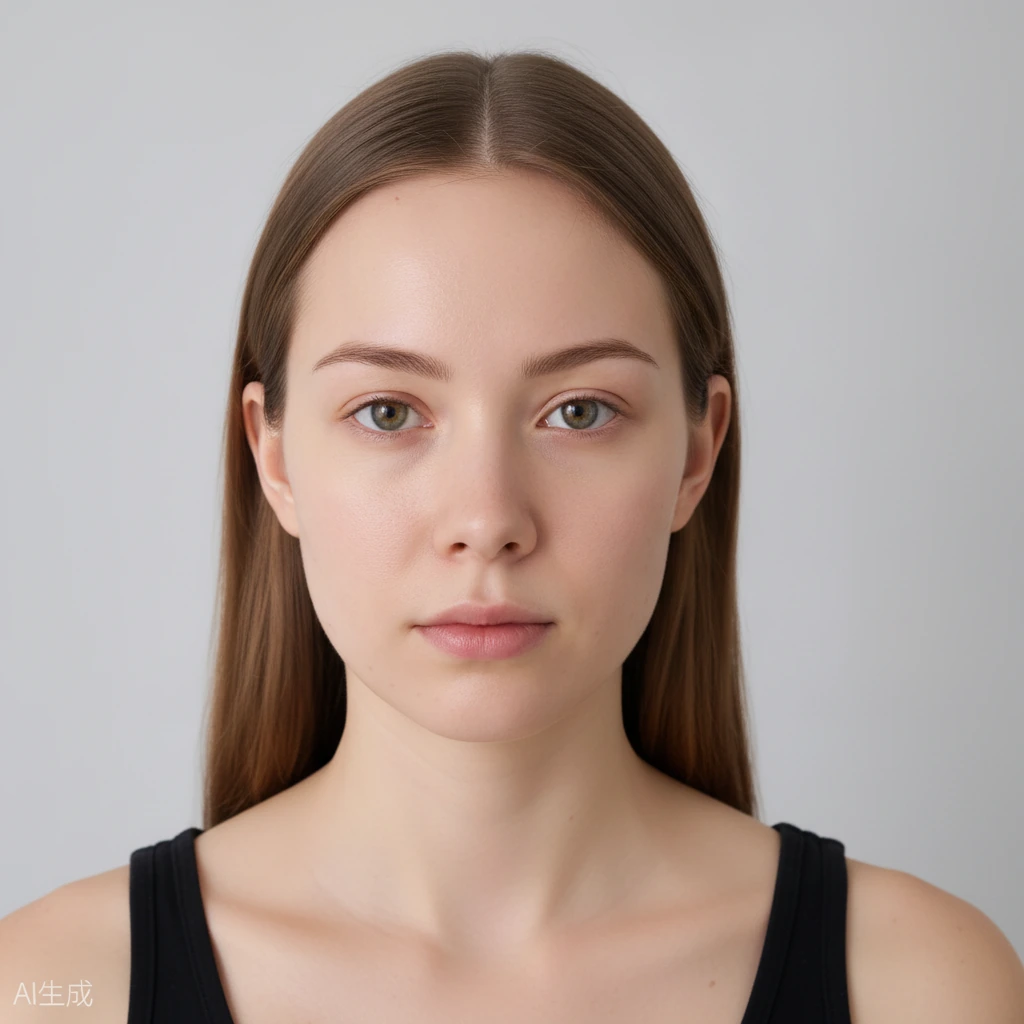
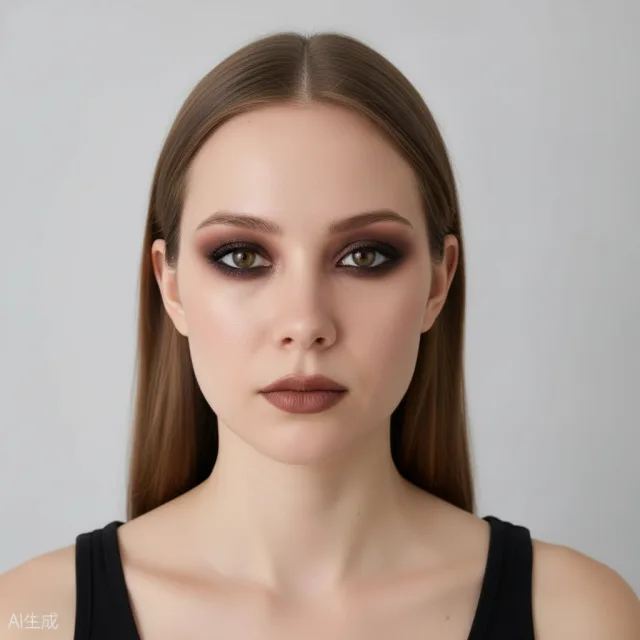 BeforeAfter
Why a Smokey Eye Makeup Try On Beats Guessing
Most people decide on a smokey eye at the last minute, in front of a mirror, hoping the blend works out. A preview removes that gamble. You see the finished effect before you pick up a brush, so you know whether the intensity is right for the occasion and how it sits with the rest of your features.
Because the makeup is applied to your actual photo rather than a model's, you are judging it on your own proportions. The preview keeps your identity, face shape, hairstyle, and background unchanged, so the only thing moving is the makeup itself. That makes it a genuine test of the look, not a stand-in for one.
That is the real payoff: instead of guessing in front of a mirror and hoping it works, you see the finished smokey eye on your own face. You decide with your eyes open, well before the makeup goes on for good.
How Eye Shape Changes the Look
A smokey eye is not one fixed design. On almond eyes, shadow can be taken outward and up to draw out the natural shape. On hooded eyes, placement matters more than depth, because shadow can disappear when the eye is open, so it usually sits higher and softer. On round eyes, blending wider toward the outer corner adds length rather than height.
That variation is exactly why a preview helps. Rather than copying a tutorial built for someone else's eyes, you see how a blended dark eye actually falls on yours. You can check whether the outer corner reads too heavy, whether the inner corner stays clean, and how the look balances with your brows and lips.
Trying it on is the only way to know which placement flatters your own eyes. The difference between too much and just enough shadow is smaller than it looks from a photo of someone else.
How to Run a Smokey Eye Makeup Try On
Open the tool in your browser on your phone or desktop. No download, no account. Take a front-facing selfie in even light with your eyes open and looking straight ahead, then upload it. A clear, straight-on photo gives the AI what it needs to place the shadow correctly around each eye.
Choose the Smokey Eyes look and let the tool apply it. Within a minute you have your photo back with the makeup on. Use the before-and-after comparison slider to move between the original and the result, so you can see exactly how much darker and wider the eyes have become.
From there, refine it. The face-part controls let you adjust the eyes on their own, and the intensity slider dials the smokiness up or down. Going softer gives you a smoked-out everyday version; pushing it higher gets you a full evening eye.
Matching the Smokey Eye to the Rest of the Makeup
A smokey eye usually works best when the rest of the face stays quiet, so let the preview show you the whole picture. A neutral nude lip keeps all the attention on the eyes, while a stronger lip turns it into a bolder evening look. Seeing both at once stops you from overloading the face.
Try the same look with different intensity to find the balance that suits you. When you find a version you like, download it or share it, and keep it as a reference for recreating the look yourself. Your photos stay private, are never submitted to search engines, and expire automatically after a limited time.
Set the preview beside your outfit and your plans for the evening. The right intensity often becomes obvious without any second-guessing.
Frequently Asked Questions
Is the smokey eye makeup try on free?
Yes. You get free daily generation credits and do not need an account to start, so you can preview and adjust the look at no cost.
Will it work on hooded or round eyes?
Yes. The tool applies the makeup to your own photo, so the shadow follows your actual eye shape and you can see how it sits when your eyes are open.
Does the tool change anything other than the makeup?
No. Your identity, face shape, hairstyle, and background all stay the same. Only the makeup is changed, so it is not a face swap.
Can I make the smokey eye softer or heavier?
Yes. Use the intensity slider to dial the look up or down, and the face-part controls to work on the eyes on their own.
Can I keep or share the preview?
Yes. You can download the result or share it. Uploaded photos and results expire and are automatically deleted after a limited time.