Party Makeup Look Try On: Test Sparkle Before You Go Out
A party makeup look try on is most useful when the party has bad lighting, which is to say most of them. The Party look on aitrytry is a sparkling, night-out style built for low light, and the preview lets you see how it lands on your own face before you commit to it. You upload a front-facing selfie, pick the look, and the AI applies it to your photo in under a minute, right in your browser, with no sign-up to start.
Before and After Example
Drag the slider to compare the original photo with the AI try-on result.
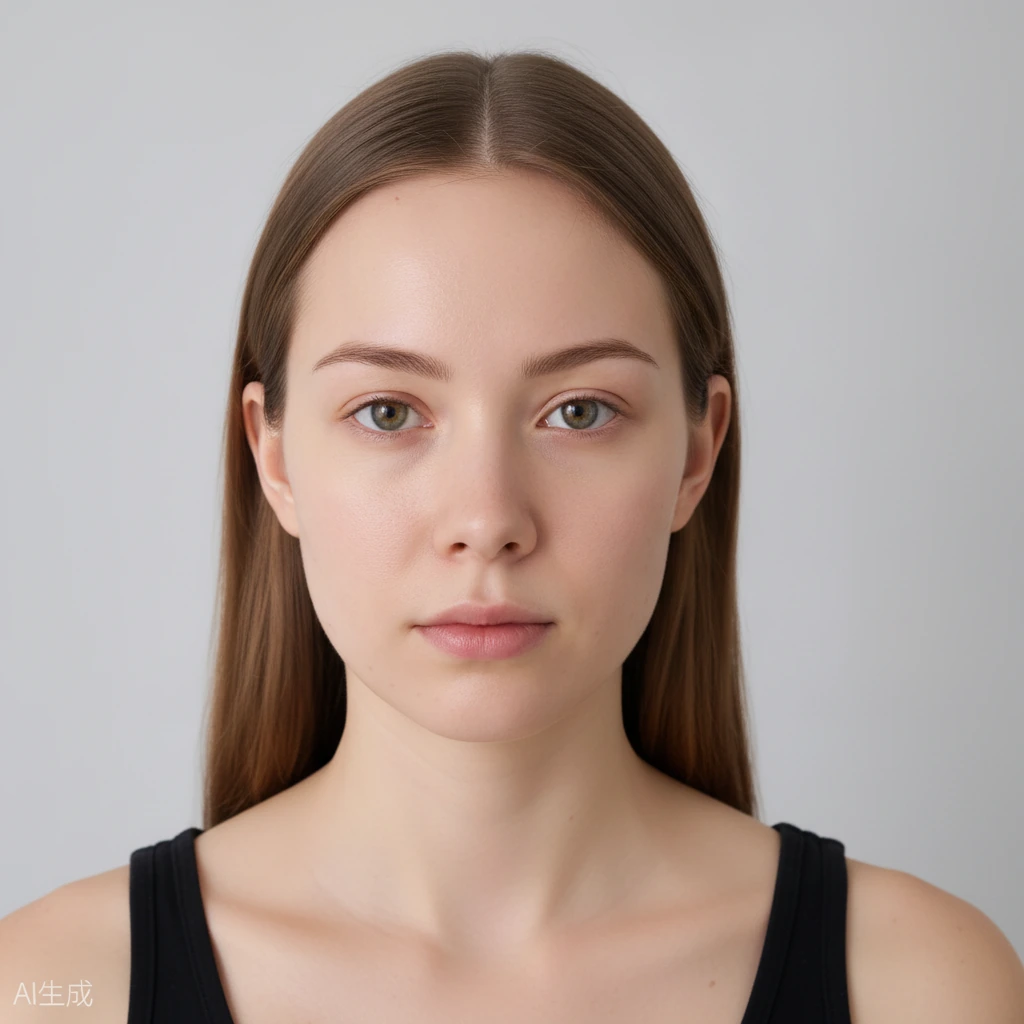
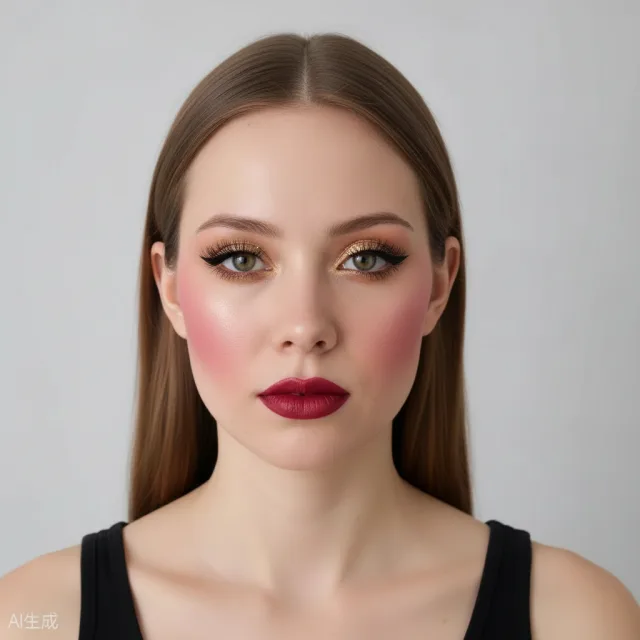 BeforeAfter
What a Party Makeup Look Try On Helps You Decide
Night-out makeup fails in two ways: it vanishes in dim light, or it photographs as a flat, shiny patch the moment a flash goes off. A party makeup look try on puts the look on your own face so you can spot which of those is happening before the evening even starts.
The Party look is designed for sparkle and a bit of drama, and that is exactly the kind of makeup that behaves differently depending on the light around it. Seeing it on your own features, with your own eye shape and skin, tells you far more than any product description ever could.
The AI only changes the makeup. Your identity, face shape, hairstyle, and background stay untouched, and it is not a face swap, so you are judging the makeup and nothing else about how you look.
How Sparkle Behaves Under Flash and Indoor Light
Shimmer and glitter catch light, which is the whole point, but the same sparkle that looks subtle indoors can flare bright the moment a phone flash fires. A preview helps you decide whether you want that reaction or something calmer and more controlled.
Indoor lighting is usually warm and comes from odd angles, so a shade that looks balanced in daylight can turn muddy or over-warm at a party. Checking the look in a few lighting situations lets you see how the tones hold up instead of hoping for the best.
Because you can compare before and after with the slider, small differences become obvious. If the sparkle feels loud, applying makeup to the eyes alone and lowering the intensity with the slider is a quick way to keep the shine but lose the glare.
The Party Makeup Look Try On and Strong Features
Some people worry that a sparkly night-out look will overpower their features. There is no way to know that from a generic photo, because it depends entirely on your eye shape, your brows, and the natural contrast in your face. A try on on your own photo is the only fair test.
It is also a safe way to experiment. You are not buying a product or committing to an actual application, and your photo and result stay private. They are stored securely, never submitted to search engines, and expire and are deleted automatically after a limited time.
If the full Party look feels like too much, you do not have to walk away from it. Tone down one area, keep the rest, and preview again until the balance matches the kind of night you are actually having rather than an idea of one.
Planning a Night-Out Look With One Preview
Start with a clear, front-facing selfie in even light so the AI can place the makeup where it belongs. If you plan to take a lot of photos at the event, it is worth thinking about how the look reads with a flash, not just how it looks in the bathroom mirror.
Try the Party look alongside the Natural Glow and Clean Girl looks if you want a calmer option, and download whichever you prefer. There is no sign-up to start, and free daily credits let you keep comparing looks across different days.
Everything runs in the browser on a phone or a desktop, so you can check a look in a spare minute. Keep the downloaded result as a reference, and you have a clear plan for the night instead of a rushed experiment in front of the mirror.
Frequently Asked Questions
Will the party look work in dim lighting?
The Party look is built for night-out sparkle, and a preview lets you see how the tones and shimmer sit on your face. You can check it in different light before the event.
Can I try it on my phone?
Yes. The tool runs entirely in your browser on both phones and desktops, with nothing to download or install.
The sparkle looks too strong. Can I soften it?
Yes. You can apply makeup to individual areas like the eyes and use the intensity slider to turn the shine down while keeping the rest of the look.
Is this a face swap or a filter that changes my face?
Neither. The AI only changes makeup, so your identity, face shape, hairstyle, and background stay the same.
What does it cost?
You get free daily generation credits, with no sign-up required to start.