Virtual Makeup Try On: See the Look on Your Face Before You Commit
A virtual makeup try on puts the finished look on your own photo instead of a model's. You upload a front-facing selfie, pick a look, and the tool applies lipstick, eyeshadow, blush or a complete face to your picture in under a minute. What comes back keeps your features, your skin tone, your hairstyle and your background exactly as they were — only the makeup is different. That distinction matters: a filter that swaps your face tells you nothing about how a shade suits you, while a preview built on your own photo answers the question you actually have, which is whether this colour and this intensity work on this face.
Before and After Example
Drag the slider to compare the original photo with the AI try-on result.
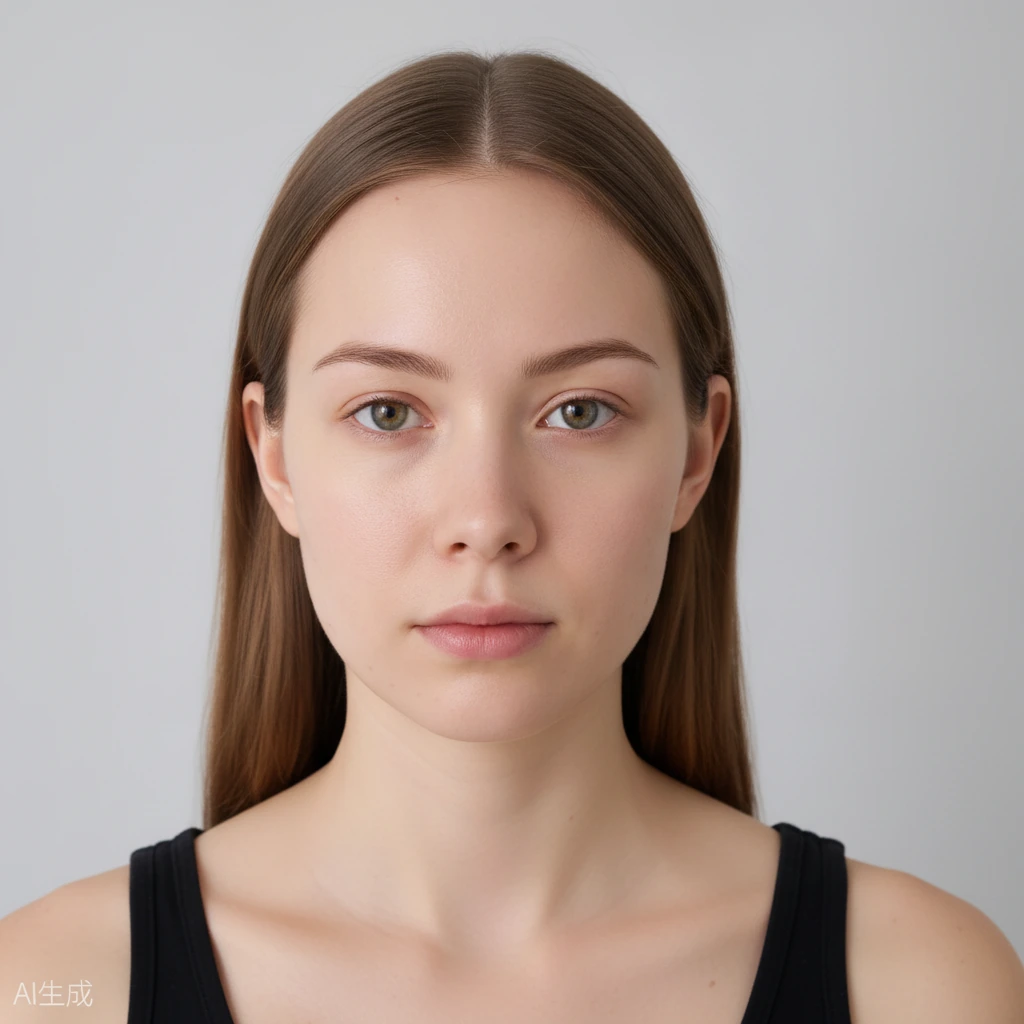
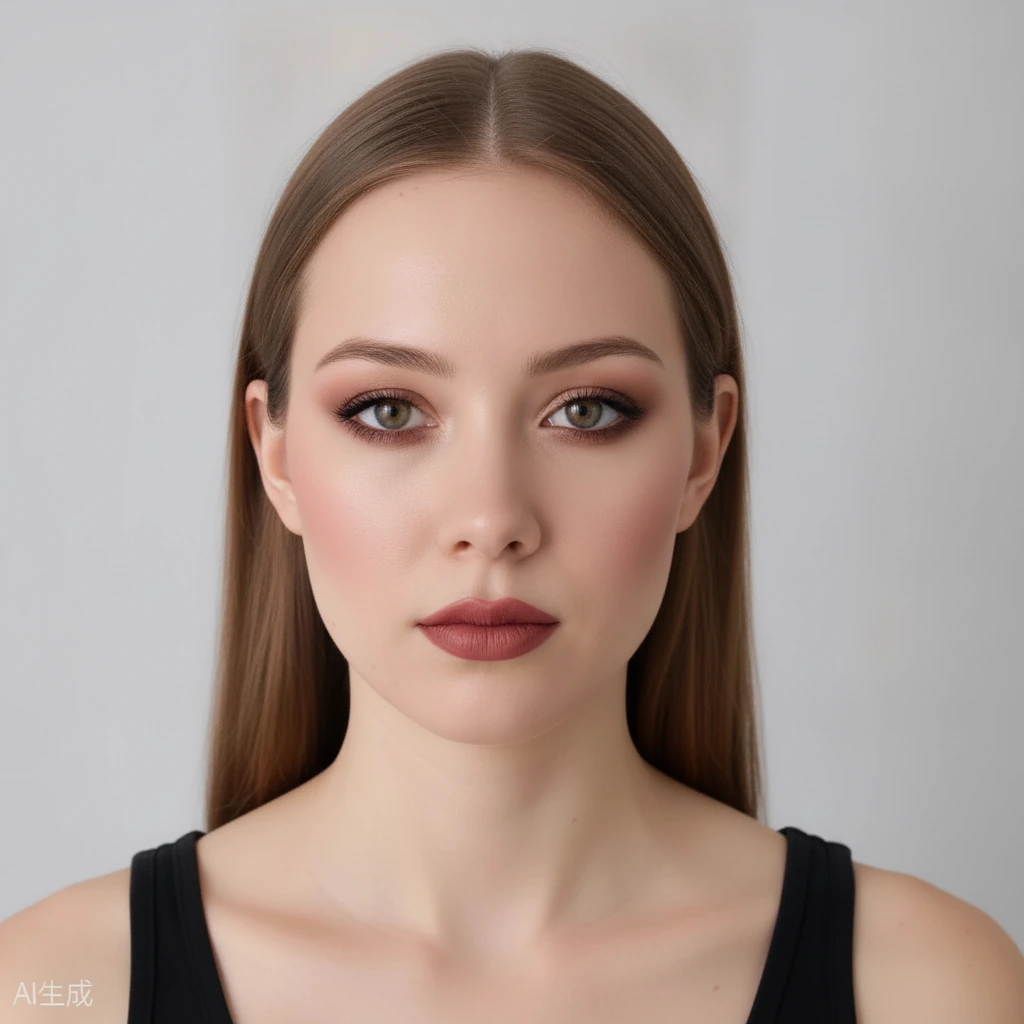 BeforeAfter
What a Virtual Makeup Try On Actually Solves
Buying makeup blind is the problem most people are trying to fix. A lipstick that looks warm in a product shot can pull orange on a cooler complexion, and an eyeshadow that reads neutral in a pan can turn muddy once it is blended over a primer. Swatching on the back of your hand answers a different question than the one that matters, because the skin on your hand is not the skin on your face.
A virtual try on removes that gap. You are not imagining how a shade might translate — you are looking at it applied to your own cheek, your own eyelid, your own lip line. The comparison is direct and immediate, so the decision stops being a guess.
The other thing it solves is timing. Most people plan a look the night before an event, in artificial bathroom light, with no way to check it against daylight or against the outfit they have already chosen. A preview lets you test three versions in ten minutes and pick the one that holds up.
It is also the cheapest way to experiment. Trying a bold look costs nothing here, which means you can find out that a graphic liner does not suit your eye shape without buying the liner, the brush and the remover first.
Why This Is Not a Filter
Social filters are built to produce an attractive image, not an accurate one. They reshape jaws, enlarge eyes, smooth texture and change skin tone, and the makeup on top is applied to a face that is no longer yours. That makes them useless as a preview: the result flatters a version of you that does not exist.
A virtual makeup try on works the other way round. The face stays fixed and only the makeup layer changes, so what you see is a fair test. If a shade looks wrong on the preview, it will look wrong in person, and adjusting the intensity in the tool tells you something real about how much product you actually need.
Keeping the background and hair unchanged matters more than it sounds. Judging a look in isolation is misleading, because the same makeup reads differently against a dark top, a bright wall or an office background. Seeing the whole frame lets you judge the look in context.
The practical consequence is that you can trust the preview enough to act on it — to buy the shade, skip the shade, or book the appointment with a reference image in hand.
How to Take a Photo That Gives a Useful Result
Light is the single biggest variable. Face a window during daylight, or stand under even, diffuse light, and avoid a lamp directly above you. Harsh overhead light drops shadows under the brow and nose that the tool will faithfully reproduce, and you will end up judging the makeup on lighting that is not typical of anywhere you actually go.
Shoot straight on, eyes open, mouth relaxed. A three-quarter turn is flattering in a portrait but makes it harder to judge symmetry, and a closed mouth hides the shape of the lip you are testing. Hold the phone at eye level rather than below the chin.
Skip heavy existing makeup for the first pass. A clean face gives the clearest read on a single product, and once you know how a lipstick behaves on bare skin you can layer it onto a full look and see how it interacts with everything else.
Resolution matters more than camera quality. A sharp, well-lit photo from an older phone beats a soft, dim one from a new phone, because the tool needs clear edges around the eyes and lips to place the makeup accurately.
Where a Virtual Try On Fits in a Real Routine
Before buying: test the exact shade you are considering against your own skin in daylight, then compare it to two alternatives side by side. This is the highest-value use, and it is the one that saves the most money.
Before an event: build the full look — base, eyes, lip — a week ahead and check it against the outfit and the lighting you expect. If the venue is dim and warm, a look that reads subtle in daylight may disappear entirely; the preview will show you that in advance.
For special-occasion or costume looks: test bold choices that you would not risk without seeing them first. A wedding guest look, a party look or a themed shoot all benefit from a dry run on your own face.
For learning: compare a soft version and a strong version of the same look to understand where your own features sit on that scale. That knowledge carries over to real application, because you will know what counts as too much on you specifically rather than in general.
Frequently Asked Questions
Is the virtual makeup try on free?
Yes. You get free daily generation credits and can start without creating an account, so you can test several looks at no cost.
Does it change my face or just the makeup?
Just the makeup. Your identity, face shape, skin texture, hairstyle and background stay unchanged — it is not a face swap or a beauty filter.
How accurate is the colour compared to real makeup?
The tool shows how a shade reads on your skin tone and features, which is the question that matters for choosing a product. It does not simulate texture, finish or wear time, so treat it as a colour and placement preview rather than a physical simulation.
What kind of photo works best?
A front-facing selfie in even daylight, eyes open, mouth relaxed, with little or no existing makeup. Sharp and well lit matters more than camera megapixels.
Are my photos kept private?
Uploaded photos and results are not public, are never submitted to search engines, and expire automatically after a limited time.